

COMPANY
Matter Motor Works
SCOPE
An ecosystem of Matter's Internal Operations (I covered Sales Module in this case study)
TIMELINE
8 to 9 months
TEAM
2 Designers, 1 engineer, 1 QA and 1 Manager
Project Details
Three unknowns, one launch. We were building a greenfield tool, no prior version to iterate on, no existing patterns to inherit. The users using it were selling a product (an EV) that most customers had never owned, using a tool they'd never used before, in a category where trust is the entire conversion mechanism. That's 3 simultaneous unknowns: the product (D-Suite), the category (EV) and the user's confidence. Most greenfield builds deal with one. We dealt with all 3 in parallel. D-suite is the internal enterprise product suite which covers a Sales Module for lead management with features like lead scoring, nudge-based actions, a colour-coded urgency system, and an activity timeline, a Service module (used at EV service outlets) and a Provisioning Module to enable cloud services.
Smart Nudges and Prompts
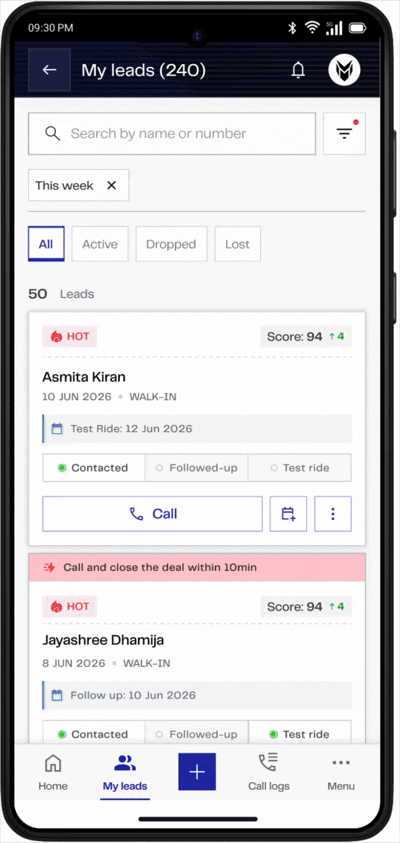
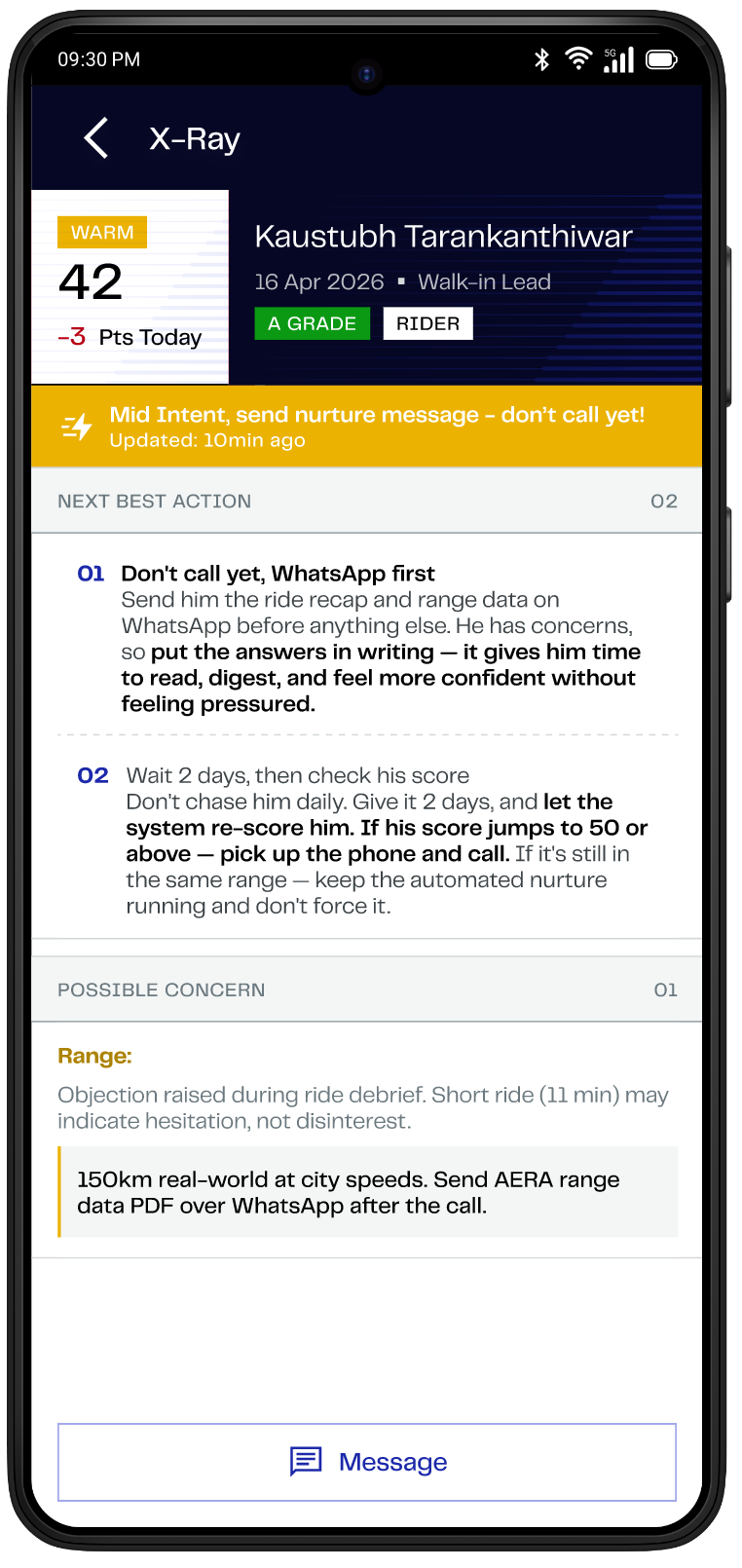
1. AI-assisted nudges for salespeople to know the next action they need to take. The whole idea behind this is to never let a lead go unattended. This reduces the mental fatigue of figuring out what action needs to be performed on a lead, and also avoids repeated or unnecessary calls to the lead.
2. AI-assisted prompts first analyze the lead profile and collect data across Matter's ecosystem to create a persona, and accordingly suggest actions to help convert the lead into a buying customer.
3. Lead Scoring Mechanism: Automatically scores and ranks leads based on their engagement, behavior, and readiness to buy, helping sales executives prioritize high-intent leads and focus their efforts where conversion is most likely.

Customer 360
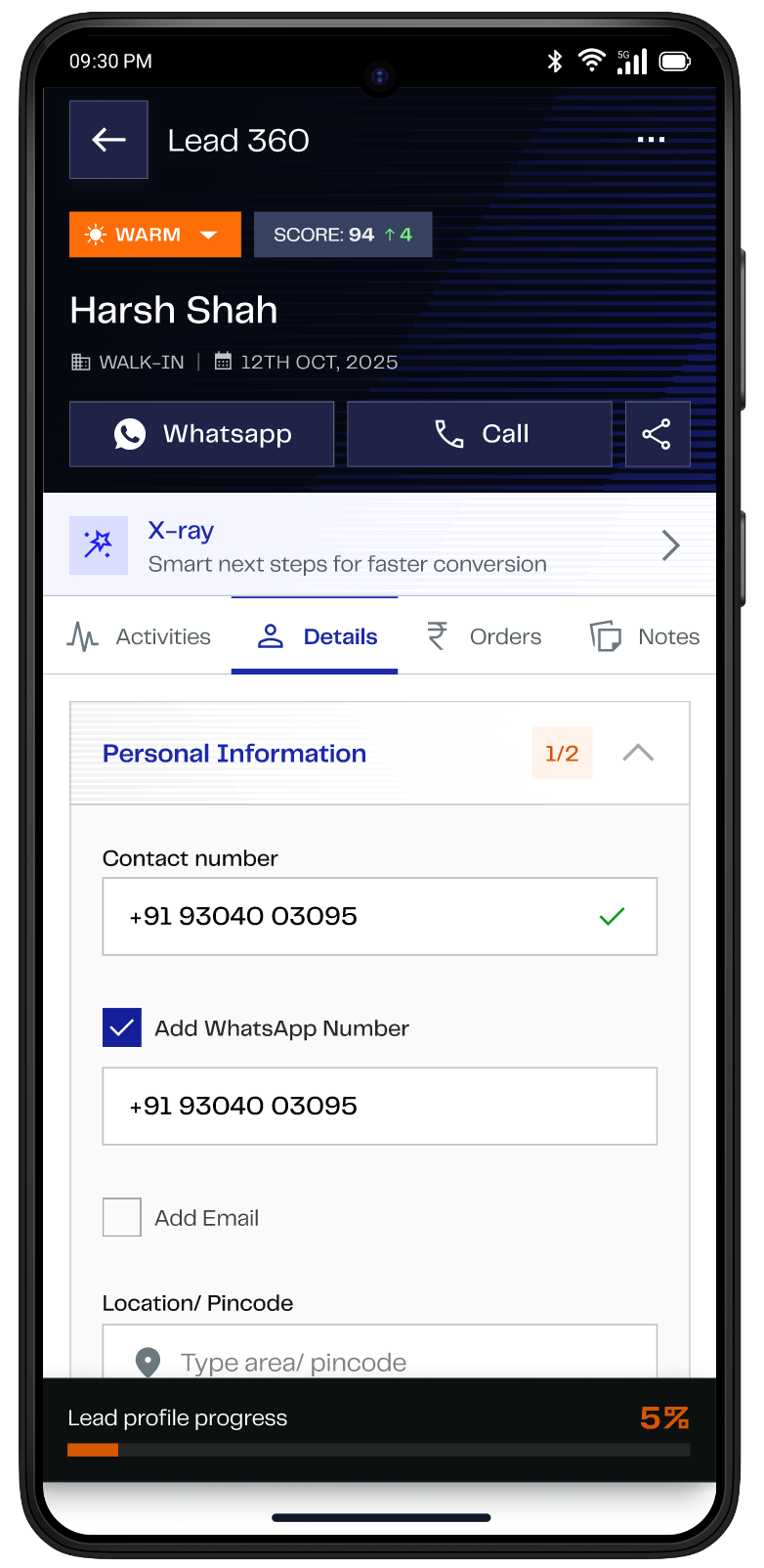
1. Customer 360 Overview: Provides a comprehensive overview of the customer by consolidating information collected in Zoho, enabling detailed lead analysis.
2. Activity Timeline: Includes a comprehensive list of all activities and touchpoints the lead has had with Matter, giving sales executives complete visibility into the lead's journey.
3. Need Assessment: Captures the lead's basic riding behavior and preferences, allowing the system to prompt the sales executive on the next best action or how to steer the conversation.
4. Purchase Flow: Enables the user to place an order for Matter's product on the customer's behalf. This includes vehicle configuration, selection of subscription packages, and editing or canceling the order.


What will you see in this case study?
D-suite built for Enterprise scale. It is the extension of the CRM. All the data fed into D-suite gets integrated with Zoho CRM for analysis.
Setting context for D-suite
Core features of D-suite and my role in the entire process
Phase 01 designs and decisions made
Phase 01 completely focused on function over form
Why and what we did for phase 2
We brought automation and AI integration in phase 02
Comparitive analysis of phase 01 and 02
Design difference between the 2 phases post UAT
Over the Past 3+ years, I've contributed to
Many Roles and Responsibilities
Building & scaling the design capability for D-suite from a small founding team to a cross-functional delivery engine, while driving product vision across design and business stakeholders.
1. Leading the Enterprise Team of 4 people
2. Creating a Product Roadmap
3. Ideating and quick concept generation
4. Creating a detailed Product Story
5. Collaboration with CFTs for aligning stakeholders
6. Gathering requirements across CFTs
7. Creating detailed Information Architecture
8. Phasing the features as per impact (must-haves & good-to-haves) and feasibility
9. Helping the team with the Design System
10. Helping the team with wireframing
11. Wearing the hat of a pixel pusher
12. Final Dev-hand off
13. Maintaining quality checks with the QA team
14. Taking up ad hoc requirements
15. Participated in UAT to gather feedback

Let’s talk in depth about the Sales Module
The Sales MVP was built with a direct objective to capture leads by recording their mobile number and offering them a test ride in an enclosed space in Ahmedabad.
Phase 1 was feature-heavy and included a lead-nurturing process; however, post-UAT for Phase 1, we received several pieces of feedback from users, which we are now implementing in the ongoing Phase 2.

Key Business Goals
1. Enable Higher Sales Conversions & Bookings
2. Improve Speed & Efficiency of Operation
3. Ensure User Confidence & Adoption
Key Decisions
1. Resumable flows over strictly linear ones — Designing for interruption (walk-ins, calls, follow-ups) instead of a clean start-to-finish journey.
2. Shared design system across modules — Sales, After-Sales, and Provisioning share components and patterns rather than evolving independently.
3. What to automate vs. keep manual — Automating tracking/nudges (follow-ups, ride-stat readiness) while keeping judgment calls with the sales exec.
4. Non-monetary rewards and recognition for sales reps — Designing in-app recognition (badges, leaderboards, milestone call-outs for things like fastest follow-up or highest test-ride-to-conversion rate) to drive engagement and motivation beyond just incentive payouts — reinforcing behavior the business actually wants, without adding to the payroll/finance loop.
Impact : Story in Numbers
Over the following quarter, lead-to-booking conversion moved from 5% to 20%. There has been a good number of increases in dealerships across India. I can't attribute the full shift to design alone but the behavioural change was visible before the numbers moved: EGs stopped relying on personal WhatsApp notes or physical notebooks to track context.
5% to 20%
Application used in 26+ dealerships across India with more than 100 users using it everyday to structure their workflow.
26+
A synthesised data output of hundred of leads that make sense.
Data
Output

Features for Sales which were further phased out
How I prioritise features (Kano Process)
This process helped me to prioritize product features based on how they impact user satisfaction


Archetype: Understanding Users
Let's understand the type of users I am designing for. This activity was performed in collaboration with the research team.

User Journey
This is a non-liner user journey that has layers of work done on it. Happy to share this in on-on-one
Post MVP we built Phase 01 to be used in OEM and Dealerships. This included prioritising function over form.
This is the check-in process. The business wanted number verification to be done at the very beginning, when the customer enters the dealership. Through the check-in process of starting and ending the visit, they also wanted to capture the timeframe the customer spent at the dealership or OEM

Home-Page
Bottom sheet to capture the lead's details
Number verification through OTP
Lead captured successfully
In this process the user can schedule the dealership (E-hub) visit or home-test ride for the lead. The user can also view the scheduled visit by the lead from other Matter's touchpoints.
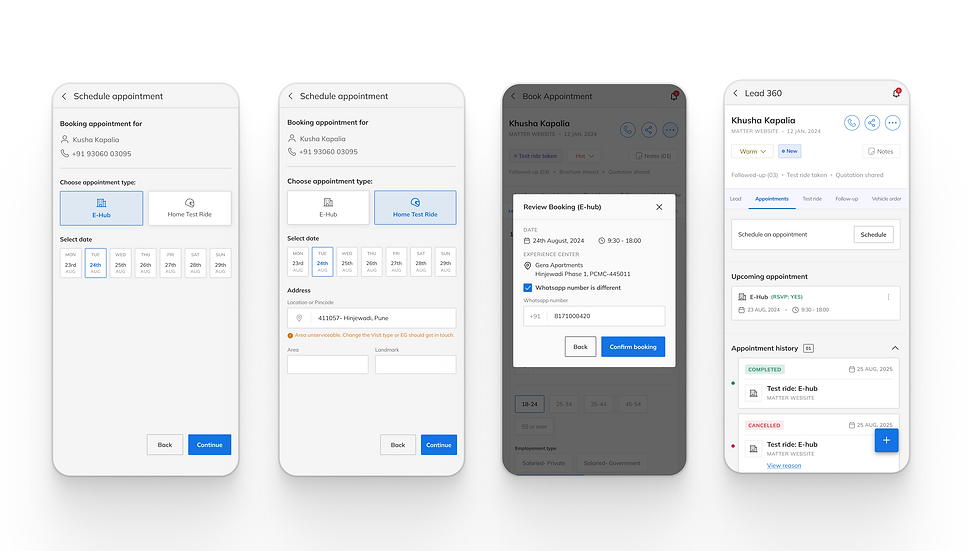
Schedule appointments - E-hub
Schedule appointments - Home Test Ride
Booking review pop-up
List of scheduled visits
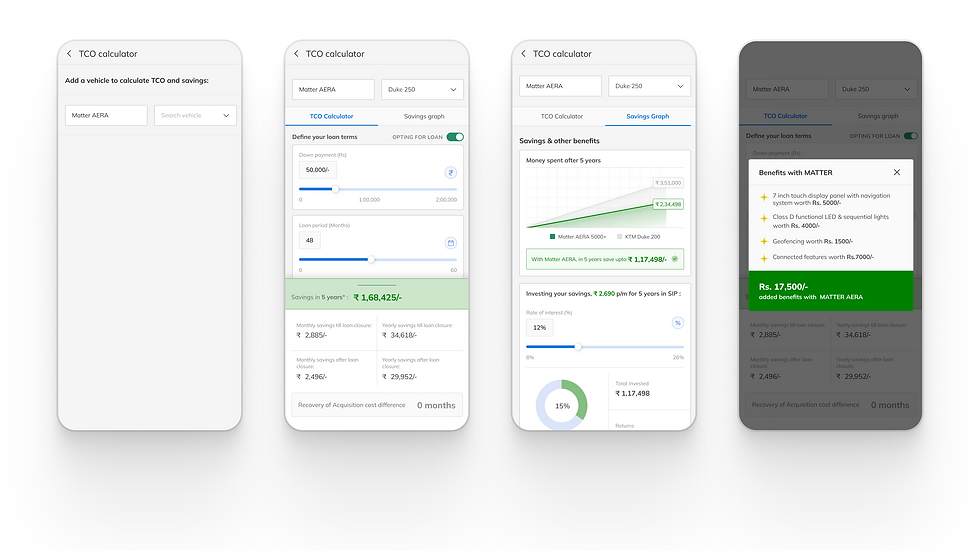
The TCO calculator and savings graph help leads and customers understand how much they can save if they choose a Matter electric vehicle over an ICE vehicle. It also shows that if they invest their savings over a few years, they can earn a considerable profit
Selection of ICE vehicle
Selection of down payment, loan period and other fields to understand the savings
Savings graph shows the amount saved over the period of 5 years if the lead buys Matter
Pop-up to show benefits with Matter
Once the lead becomes inactive or asks not to be disturbed, the Sales Manager can drop this lead. Here's a process showing that

Long pressing on lead's card initiates the Drop Lead process
After clicking Drop Lead, the app asks reason for it
There is an open field to type further description if needed
Here the lead successfully gets dropped
Hold up... it's not that straight, you know? If design thinking was a linear flow, my brain would’ve short-circuited by step two.
"
"


We did a Usability Testing post the release of Phase 01
1. A qualitative approach was taken to understand in-app experiences using task-based observation, capturing metrics like task success/failure, Errors, and points of confusion (if any).
2. A total of 11 In-depth interviews were conducted at Pune & Bangalore dealerships with EGs, Sales Officers & Dealer principals

70%
of the users responded that the process was cumbersome
8 of 10
of the users were not satisfied with check-in and test-ride process
Success Failure Analyses

Key Insights
Few UX Design gaps were observed increasing cognitive load & confusion affecting EGs’ workflow, their productivity and morale in turn causing dissatisfaction.
KEY FINDING 1
LEAD DUPLICATION RISK
EGs are not using the Search bar option to check whether the Lead already exists in the system, as it a longer process.
This behavior is resulting in duplication of leads if the number is not verified.
KEY FINDING 2
EGs FORGET KEY WORK-
FLOW ACTION
EGs tend to miss certain key actions like clicking Start Visit, End Visit and End Test Ride CTAs resulting in missing time stamp data
KEY FINDING 3
NO FEATURE PROVISION FOR DIGITAL DL USECASE
For scenarios where customer has digital DL, EGs encounter an issue in uploading DL. Since digital DLs do not have a back side, and the “Upload DL feature requires two images.
As a workaround, the EGs upload the same image twice
KEY FINDING 4
NOTES FEATURE IS SCATTERED & INCONSISTENT
EGs can enter notes in multiple places (Lead notes, Call description, follow-up notes) & they are adding different notes interchangeably leading to data fragmentation.
Example scenario: AN EG was
copying content from Lead notes and pasting them in follow up note
As a lead designer, some key decisions that I took post the UAT of Phase 01
1. Revamp the entire design system as enterprise does not always mean "boring"
2. Introduced Lead scoring mechanism for EGs to have prompts and nudges. No lead in the system should go unnoticed.
3. Cut short 6 sales stages to 3 to avoid confusion
4. Introduction of Rewards and Recognition to boost motivation to achieve targets


Let's compare the phase 02 screens with phase 01 - Home Page
Post the feedback, we made several changes in UX and revamped the entire design system.

Changes in Lead Card that led to more prominence to the activity done, increased affordance of lead type and addition of lead score
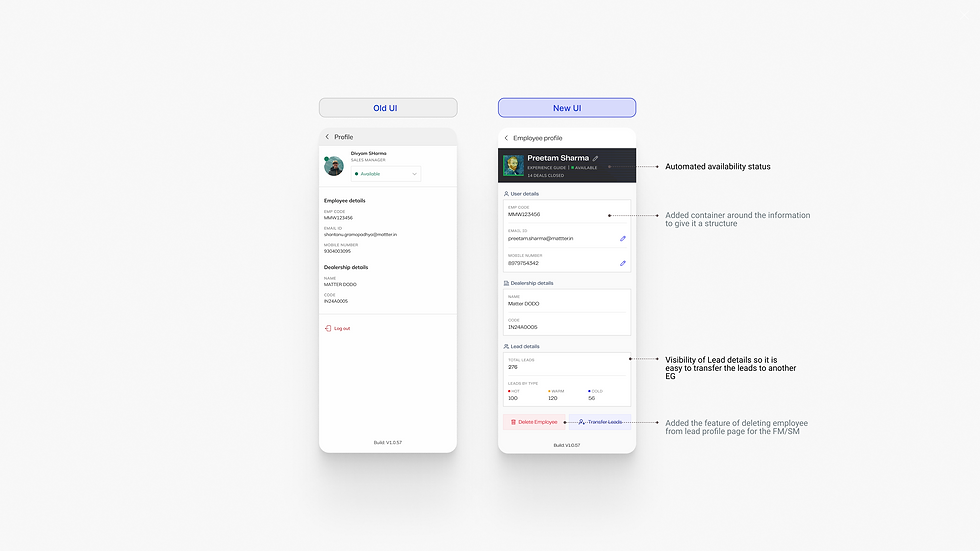
Sales Representative's Profile as seen by Sales Manager
Key Insights
Few UX Design gaps were observed increasing cognitive load & confusion affecting EGs’ workflow, their productivity and morale in turn causing dissatisfaction.

Some more Old vs New Designs post the User Feedback
Changed the log-in credentials from employee ID to employee email Id to remove the cognitive load of memorising things
Added X-ray section for needs assessment. X-ray takes you to the prompts, which help the user to pitch the bike to the lead
A good-to-have feature to change between the list view and calendar view for scheduled activities for the leads

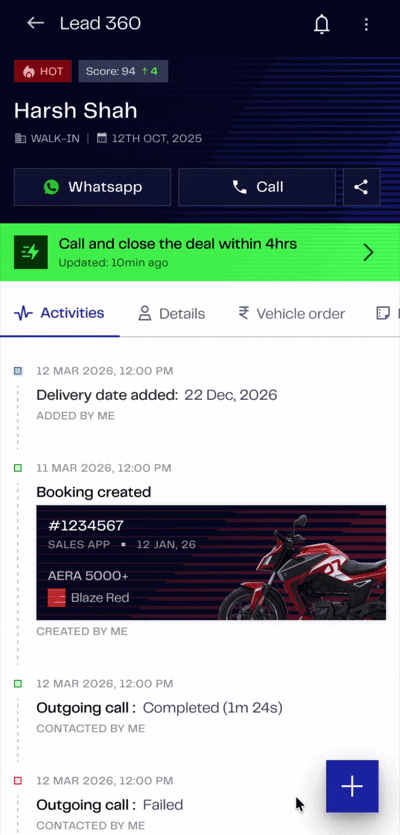

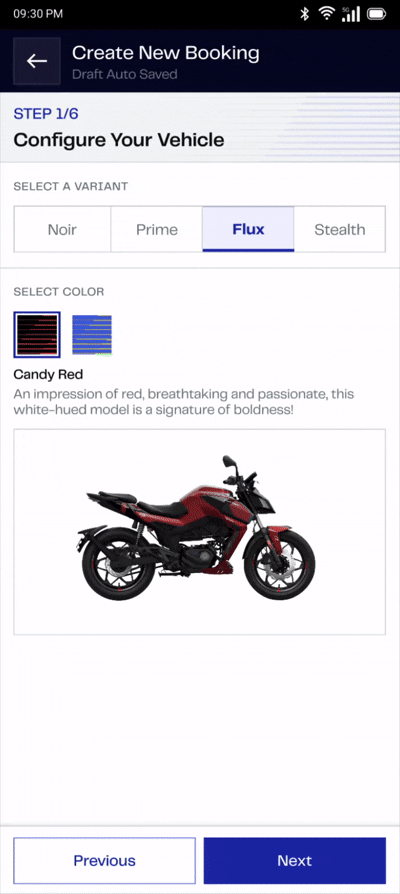
Introduction of Activity section, changing lead type (hot, warm & cold) and revamp of the Purchase order flow (addition of subscription model)

Sharing brochure and quotation with the leads on the go
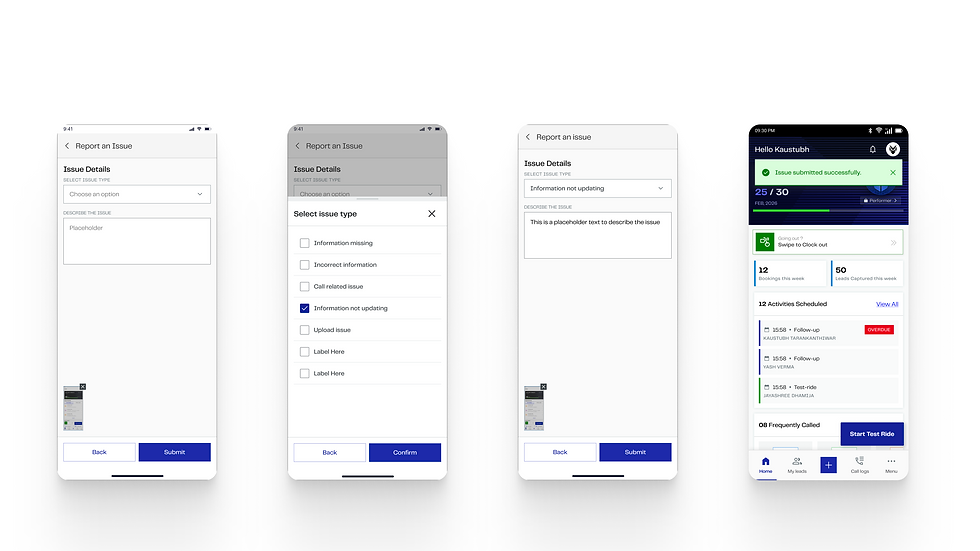
Report an issue by shaking the screen, which captures a screenshot. Inspired by Instagram interaction
What I Learned as a Designer

Achievements & Momentum
Lessons from Early Hiccups
In the end : When I finally look back
Designing Sales Module for D-Suite product has been both a professional leap and a personal milestone: teaching me to think system-wise, empathize ruthlessly, and collaborate fearlessly.
-
Designing for real-world sales behavior, not ideal workflows : Sales staff work in interruptions (walk-ins, calls, follow-ups mid-task), so I learned to design flows that support resumability and quick re-entry rather than assuming a clean, linear path.
-
Balancing speed vs. data completeness : Sales wanted fast lead capture, while downstream teams (like After-Sales) needed richer data. I learned to phase data collection instead of front-loading it, so speed and completeness didn't have to compete.
-
Designing within engineering constraints : Learned to work closely with engineering to understand technical trade-offs (like data sync delays), then design around them—such as using loading states—to keep the UX intact without compromising feasibility.
-
Shipped at scale — Sales module live across 26+ dealerships, not a pilot.
-
Reduced follow-up gaps — Automated stage-based nudges so leads didn't fall through manually.
-
Faster feature velocity — Reusable design patterns meant new features shipped without rebuilding from scratch each time.
-
Assumed linear flows, got interrupted reality : Early designs assumed sales staff would complete tasks start-to-finish; real usage was interrupted, so I redesigned for resumability.
-
Underestimated data sync costs : First version pushed for real-time updates everywhere, which strained engineering; learned to scope sync to key checkpoints instead.
-
Logged activity without guiding action — Initial design just recorded steps (test ride, quotation); learned that data needs to prompt next steps, not just capture history.

Let's Work
Together
jayashreedhamija.com
jayashree676@gmail.com
Bangalore.
Home
About me
Contact
© 2026 by Jayashree Dhamija l Made with love